
Skip to content
Seller Labs – Essential Amazon Tools
  • Products
    • Feedback Genius
    • Ad Genius
    • Profit Genius
      • Amazon MCP
      • Data Hub
  • Pricing
  • Resources
    • Free Amazon AI Automation Course
    • Free Audits
      • Inventory Audit
      • Advertising Audit
    • Knowledge Base
    • FAQs
    • Affiliate Program
    • Monetizing Your Mental Capital Podcast
  • Blog
  • About Us
  • Contact Us
    • Schedule a Call
    • Send a Message
Get Started Login
  • Products
    • Feedback Genius
    • Ad Genius
    • Profit Genius
      • Amazon MCP
      • Data Hub
  • Pricing
  • Resources
    • Free Amazon AI Automation Course
    • Free Audits
      • Inventory Audit
      • Advertising Audit
    • Knowledge Base
    • FAQs
    • Affiliate Program
    • Monetizing Your Mental Capital Podcast
  • Blog
  • About Us
  • Contact Us
    • Schedule a Call
    • Send a Message
Get Started Login
Knowledge Base › Seller Labs Account (General) › How do I set up my notification filters?

How do I set up my notification filters?

Last updated: May 5, 2026

It is critical to make sure you are staying on top of your inventory, buy box status, campaign budget, and account connection. Our notifications help take the guess work out of these important factors in your account by notifying you if you fall below the certain thresholds you set for yourself.

To access your notifications, click on Settings under Notifications in the hamburger menu in the top left corner. From there, you can set your own parameters for your notifications.
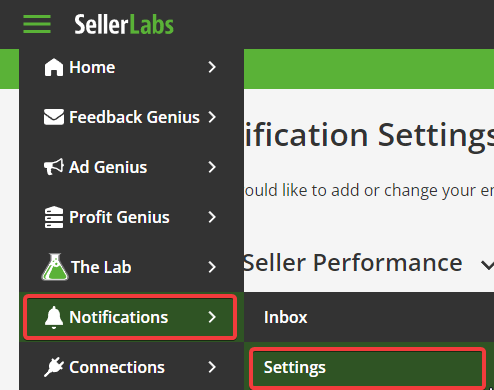
Seller Labs Menu drop down showing the Notification Settings tab

Seller Labs Notification Settings page

Notifications


Need help? Our support team is happy to assist you! 🙂

  • Connect via the in-app chat icon, located in the bottom-right of your screen while logged into any of our apps

  • Search the Knowledge Base to see if your question has already been answered

  • Make an appointment with us for more direct support

Sign Up for Seller Labs

*No Credit Card Needed

Still have Questions?

Book a Call With Our Team!

Book a Call
Seller Labs

Main Menu


  • Products
  • Pricing
  • Knowledge Base
  • About Us
  • Contact Us

Helpful Links


  • Seller Labs Blog
  • FAQs
  • Privacy Policy

Stay up to date on all things Amazon & Ecommerce

© 2026 Seller Labs all rights reserved

Website Design by Cybergogo