
1. Support for Sponsored Brand Ads
Ad Genius currently supports Sponsored Brand Ads placed through Amazon Advertising only. Within Ad Genius, you can:
-
Manually adjust bids for Sponsored Brand campaigns
-
Adjust keywords associated with your Sponsored Brand ads
-
Access suggestions, specifically:
-
Bid adjustment suggestions
-
Archive keyword suggestions
-
Note: Although Ad Genius provides insights and recommendations for Sponsored Brand campaigns, there are some operational limitations at this time (see Section 4 below).
2. Requirements for Using Sponsored Brand Ads
Before you can locate Sponsored Brand Ads campaigns in Ad Genius:
-
You must complete Amazon’s Brand Registry process.
-
Your products need to be properly associated with your brand.
-
You can only create Sponsored Brand Ads for products where you are the brand owner.
3. How to Locate Sponsored Brand Ads in Ad Genius
-
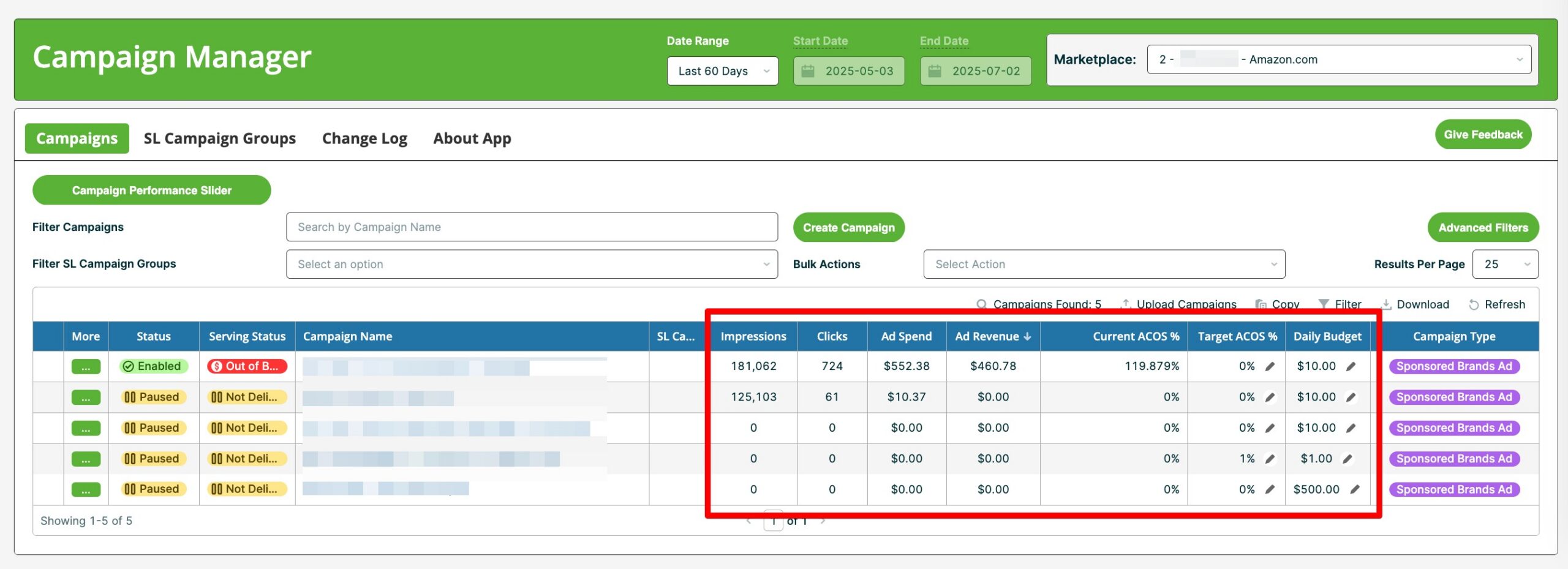
If you have Sponsored Brand campaigns active in Seller Central, you will see the Sponsored Brand Ads campaigns listed on the Campaign Manager page.

-
Sponsored Brand Ads Reporting within Ad Genius lets you monitor and analyze the basic metrics of your Sponsored Brand campaigns.
4. Differences and Limitations
-
The campaign data layout in Ad Genius for Sponsored Brand Ads is similar to Sponsored Product Ads, but:
-
Some fields are missing because Sponsored Brand Ads use different parameters and metrics.
-
-
Important Limitation:
-
Currently, Ad Genius cannot push changes (such as bid updates or keyword edits) to Sponsored Brand campaigns via Amazon’s API.
-
This means that while Ad Genius can suggest changes and report on performance, any actual adjustments must be made directly in Seller Central.
-
Once Amazon enables API support for Sponsored Brand changes, Ad Genius will be updated to support these actions.
-
Need help? Our support team is happy to assist you! 🙂
-
Connect via the in-app chat icon, located in the bottom-right of your screen while logged into any of our apps
-
Search the Knowledge Base to see if your question has already been answered
-
Make an appointment with us for more direct support
*No Credit Card Needed