You know your size tiers. You checked them when you launched, you priced the product around the fulfillment fee, and the fee has been the same line in your margin sheet ever since. Size tiers feel like a fact about the product, not a decision.
They are a decision about the box. Amazon puts your product in a tier using the measured sides and weight of the package it receives, and some packages miss a cheaper tier by less than an inch. That gap gets paid on every unit, every month, and it rarely shows up anywhere you look.
The one question: is any SKU within reach of a cheaper tier?
For each SKU, compare how far it sits past the nearest tier line with what it would cost to get back under it. If the fee saved per unit, times the units you sell in a year, beats the cost of new packaging, repackage.
- Fee gap = your current fulfillment fee − the fee in the tier (or weight band) you could reach
- Annual saving = fee gap × units per year − any extra packaging cost per unit × units per year
- Payback = one-time packaging cost ÷ (fee gap − extra packaging cost per unit)
Payback comes out in units. Divide by your monthly sales and you know how many months until the change pays for itself.
The 2026 size tier lines
Since January 15, 2026, Amazon’s US store has used eight size tiers. The new one is Small Bulky, which sits between Large standard and Large Bulky. These are the limits as published in Amazon’s product size tier definitions and summarized by AMZBase:
| Tier | Longest side | Median side | Shortest side | Length + girth | Weight |
|---|---|---|---|---|---|
| Small standard | 15 in or less | 12 in or less | 0.75 in or less | n/a | 16 oz or less |
| Large standard | 18 in or less | 14 in or less | 8 in or less | n/a | 20 lb or less |
| Small Bulky | 37 in or less | 28 in or less | 20 in or less | 130 in or less | 50 lb or less |
| Large Bulky | 59 in or less | 33 in or less | 33 in or less | 130 in or less | 50 lb or less |
| Extra-Large | Anything larger, in four weight bands: up to 50 lb, 50 to 70 lb, 70 to 150 lb, over 150 lb | By band | |||
Length + girth is the longest side plus twice the sum of the median and shortest sides. A product has to fit every limit in a row to sit in that tier. Miss one by a fraction and it moves up at least one row.
Weight has a second trap. For most tiers the fee is based on shipping weight, which is the greater of the unit weight and the dimensional weight: length × width × height ÷ 139. Small standard items, and Extra-Large items over 150 lb, use unit weight only. For Small Bulky, Large Bulky and Extra-Large, Amazon assumes a width and height of at least 2 inches when it works out dimensional weight.
So there are two ways to be in the wrong place. The box can cross a tier line, or a light product in a big box can be charged for weight it does not have.
Worked example 1: the case that is 0.15 inches too thick
Illustrative example
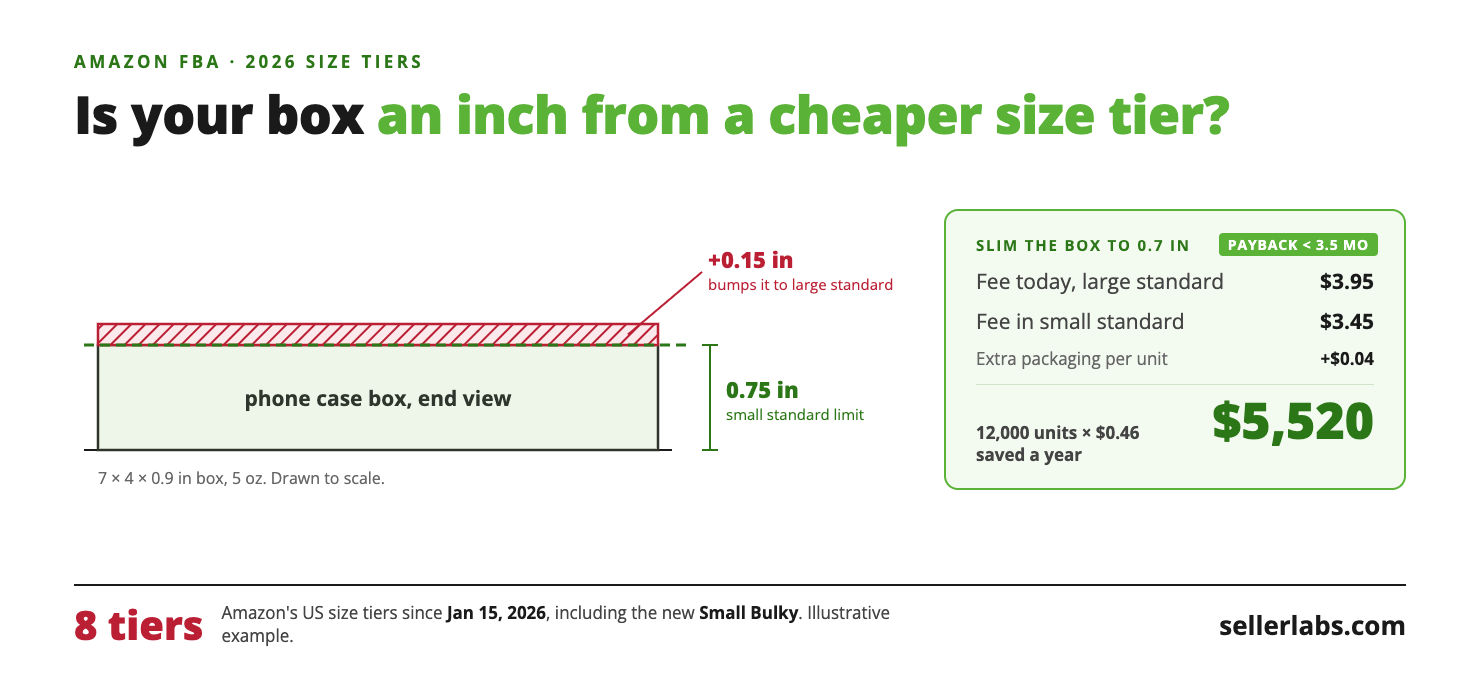
You sell a phone case in a retail box measuring 7 × 4 × 0.9 inches, weighing 5 oz. The weight and the two long sides fit small standard. The shortest side does not: 0.9 inches is over the 0.75-inch limit, so the case ships as large standard.
Say your Fee Preview report shows $3.95 per unit, and the small standard fee for the same weight and price band is $3.45. The gap is $3.95 − $3.45 = $0.50 per unit.
A slimmer box at 0.7 inches costs your packaging supplier $1,500 for a new die line and $0.04 more per unit.
You sell 1,000 units a month, so 12,000 a year. Annual saving: 12,000 × ($0.50 − $0.04) = 12,000 × $0.46 = $5,520. Take off the one-time $1,500 and the first year still returns $4,020.
Payback: $1,500 ÷ $0.46 = about 3,260 units. At 1,000 units a month, the new box pays for itself in under three and a half months. After that it is $460 a month you were handing to Amazon for 0.15 inches of cardboard.
Worked example 2: the pillow that pays for air
Illustrative example
A travel pillow ships in a 16 × 12 × 8 inch box and weighs 1.4 lb. It fits large standard on every side. But large standard uses the greater of unit weight and dimensional weight.
Dimensional weight: 16 × 12 × 8 = 1,536 cubic inches. 1,536 ÷ 139 = 11.05 lb. Amazon bills this pillow at about 11 lb, not 1.4 lb.
Vacuum-packed into a 14 × 10 × 5 inch box: 14 × 10 × 5 = 700 cubic inches. 700 ÷ 139 = 5.04 lb. Same tier, about 6 lb less billable weight.
Say Fee Preview shows $9.60 per unit today, and the fee at about 5 lb is $7.70. Above 3 lb, large standard adds a charge for every 4 oz. The gap is $9.60 − $7.70 = $1.90 per unit. Vacuum packing adds $0.15 per unit, so the net saving is $1.90 − $0.15 = $1.75.
At 500 units a month, that is 500 × $1.75 = $875 a month, or $10,500 a year, from a smaller box.
Neither fix touches the product. Both come from reading five numbers you already have.
Where to get your own numbers
Amazon’s measurements are the ones that count, not your supplier’s spec sheet. Get them from the Fee Preview report.
- Seller Central → Reports → Fulfillment. In the left menu, under Payments, choose Fee Preview. Request the report and download it.
- For each SKU, read the columns longest-side, median-side, shortest-side, item-package-weight and product-size-tier.
- Read expected-fulfillment-fee-per-unit. That is your current fee.
- Compare each measured side and the weight with the tier table above. Note how far past the line each SKU sits.
- For the fee in the tier or weight band you could reach, use the FBA fee schedule or the Revenue Calculator with the new dimensions.
If Amazon’s measured dimensions are larger than your real package, that is a different problem, and a cheaper one to fix. Measure a unit yourself, then ask Selling Partner Support to remeasure.
The tier distance check
Add four columns to the Fee Preview download and you have a list worth acting on.
| Column to add | Formula | What it tells you |
|---|---|---|
| Nearest limit missed | The first limit in the cheaper tier’s row that the SKU exceeds | Which side, or the weight, is keeping it in the higher tier |
| Distance past it | Measured value − the limit | How much packaging you would have to lose |
| Dimensional weight | Longest × median × shortest ÷ 139 (for bulky items, use at least 2 in for the median and shortest sides) | Whether you are paying for air in large standard or bulky |
| Annual fee at stake | Fee gap × units sold in the last 12 months | Which rows are worth a packaging project |
Sort by the last column. The top rows are your project list.
Which SKUs to check first
You do not need to repackage the catalog. Most SKUs are nowhere near a line.
- Anything within half an inch of a side limit. These are often a box change away from the cheaper tier, as in the phone case.
- Light products in large standard or bulky boxes. Where dimensional weight is well above unit weight, you are paying for air. Compressible goods such as bedding, apparel and plush are the usual cases.
- Anything that moved tiers on January 15, 2026. Products that were Large Bulky in 2025 and now fit Small Bulky had their fees recalculated. Check that the new tier is the one you expected.
- Your best sellers. The fee gap is paid per unit. A small gap on a high-volume SKU beats a big gap on a slow one.
After the new box ships: open a case for a size check
New packaging does not lower your fee by itself. If you sell through FBA, you need to ask Amazon to check the size once the old stock is gone.
While units in the old, larger packaging are still in Amazon’s fulfillment centers, Amazon can measure either version. The fee then flips back and forth between the two tiers, and you can end up paying the larger-packaging fee on the smaller box.
Wait until the last units in the old packaging have sold out, then:
- Measure and weigh a packed unit in the new packaging. Take photos of each side against a tape measure or ruler, and of the unit on a scale with the weight showing.
- Open a case with Selling Partner Support. Ask for a size check on the SKU, give the new dimensions and weight, and attach the photos.
- Ask Amazon to run its own check too. Your photos support the request, but Amazon’s own measurement is what updates the tier.
- Confirm the change in Fee Preview. Watch product-size-tier and expected-fulfillment-fee-per-unit until the new tier and fee show up.
Open the case too early, while old units are still selling, and a later measurement of an old box can put the SKU straight back in the higher tier.
When this breaks
Amazon measures, not you. A redesigned box does not change your fee until Amazon measures the new package. Expect the old fee on the first shipments, and open a size-check case once the old packaging sells out. Keep the Fee Preview report from before and after so you can see when the change lands.
Thinner packaging can cost more in damage. Shaving a box may raise damage in transit or at the fulfillment center. If your return rate for damage rises, the saving shrinks. Test on one shipment before you change a year of stock.
Price bands change the fee too. Amazon’s fulfillment fees also vary by selling price band. Compare fees in the same price band, or a price change will look like a tier saving.
Weight near 16 oz. Small standard’s limit is on the unit weight, packaging included. A product that sits at 15.8 oz can tip over the line with a heavier insert. Weigh the packed unit, not the product.
The fuel and logistics surcharge. Since April 17, 2026, Amazon has added a 3.5% fuel and logistics surcharge to fulfillment fees. If the Fee Preview fee includes it and the rate you compare against does not, the gap looks bigger than it is. Compare like with like.
Customer experience. Vacuum packing, folding or removing a retail box changes what the customer unboxes. If reviews mention presentation, weigh that before you take the saving.
Frequently Asked Questions
What changed in the 2026 size tiers?
From January 15, 2026, Amazon’s US store added Small Bulky, for items up to 37 × 28 × 20 inches, 50 lb and 130 inches in length plus girth that no longer fit large standard. That brought the total to eight tiers, including four Extra-Large weight bands.
Does dimensional weight apply to my product?
It applies to large standard, Small Bulky, Large Bulky and Extra-Large items up to 150 lb, where the fee uses the greater of unit weight and dimensional weight. It does not apply to small standard. Divide your package volume in cubic inches by 139 and compare it with the unit weight.
Why is my product in a bigger tier than my spec sheet says?
Amazon uses its own measurement of the package it received, including the packaging. Compare the Fee Preview sides with a unit you measure yourself. If Amazon’s numbers are larger, ask Selling Partner Support for a remeasurement.
How long until a new box changes my fee?
Only after Amazon measures the new package. Once the old packaging has sold out, open a case asking for a size check. Include photos of the new measurements and of the unit on a scale, and ask Amazon to do its own check. Then watch the product-size-tier and expected-fulfillment-fee-per-unit columns in Fee Preview.
Why does my fee keep switching between two tiers after I changed the box?
Amazon is probably still measuring units in the old packaging. Wait until the old stock sells out, then open a case for a size check with photos of the new box’s measurements and weight.
Running this across the whole catalog
A spreadsheet handles a few dozen SKUs. With hundreds, finding the handful that sit half an inch from a line is the slow part.
Profit Genius includes the Data Hub, which keeps your Fee Preview data by SKU: every measured side, the weight, the size tier and the expected fulfillment fee. With MCP Genius or the Genius Bundle, the Seller Labs Amazon MCP lets Claude read it for you. Ask: “List every SKU within half an inch of a cheaper size tier, or with dimensional weight more than twice its unit weight, sorted by units sold.” You still decide which boxes to change.
Related Reading
- Amazon Made 11 Changes. Your Spreadsheet Didn’t.
Every 2026 fee change, including the tier reshuffle, and what it does to margin. - How to Calculate Real Amazon Profit
Where the fulfillment fee sits in true per-unit profit. - Fee Audits: How To Uncover Hidden Costs
A routine for catching mismeasured products and other fees you should not be paying. - Amazon Seller Profitability in 2026
Why numbers that look fine hide fees like this one.