
You already run the Monday inventory pass. Fulfillable units, days of supply, what is inbound, what to reorder. Maybe you paste the export into ChatGPT and ask it to flag the SKUs that are running low. It answers in seconds and sounds sure of itself.
That confidence is the blind spot. A chat window gives the same fluent answer from one stale CSV as from six current reports. What decides whether an AI inventory tool is right is which Amazon reports sit behind it and how old they are.
“Amazon MCP” is one way of putting those reports behind an AI. Here is which stock questions it can answer, and which it cannot.
What an MCP server is, in seller terms
MCP stands for Model Context Protocol. Anthropic published it on November 25, 2024 and describes it as “an open standard that enables developers to build secure, two-way connections between their data sources and AI-powered tools.” It is a plug shape. Nobody logs into it.
An MCP server sits on the other end of the plug. Think of it as a menu. Each line is one named tool the AI may call: read this table, list these campaigns, update this bid. Ask Claude or ChatGPT an inventory question and the model picks a tool, the server runs it against your account data, and the model writes its answer from what comes back.
Two consequences matter more than the acronym.
- The AI cannot see past the menu. If a report is not loaded behind the server, the model either says so or fills the gap with its own arithmetic. You want to know which one you are reading.
- Some tools write. A server can expose actions as well as lookups. Ask what a server can change before you ask what it can show.
So “Amazon MCP” is a category. Seller Labs runs a server for seller data and Amazon runs one for its Ads API. Each has its own menu. The FAQ sorts out which is which.
The one test: name the report behind the question
Before you trust any AI answer about stock, finish this sentence: “That number came from the ______ report, pulled on ______.” If you cannot fill both blanks, you have a guess with good grammar.
That test decides whether an MCP connection belongs in your inventory routine. Write down the inventory questions you asked in the last 4 weeks, put the Amazon report next to each, then check whether the server holds it. The table below does the lookup.
A worked example: one reorder, two answers
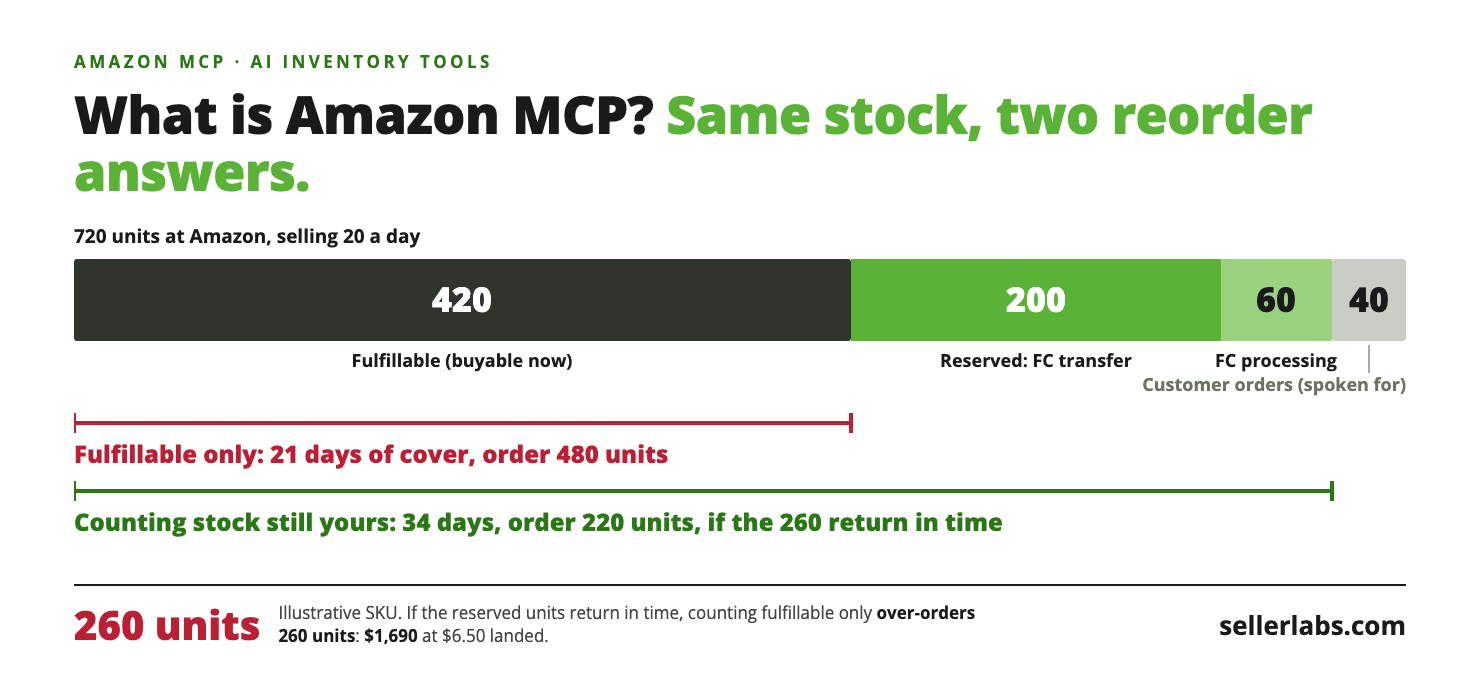
Same SKU, same morning, two reorder quantities. The only difference is whether the tool can see how Reserved breaks down.
Illustrative example
A kitchen SKU sold 600 units in the last 30 days. That is 600 ÷ 30 = 20 units a day. Lead time from your supplier is 30 days, and you want 15 days of safety stock on top, so the target is 45 days of cover: 45 × 20 = 900 units.
Amazon shows 420 units fulfillable and 300 units reserved. The 300 reserved units split three ways: 40 units held for customer orders, 200 units in FC transfer and 60 units in FC processing. Nothing is inbound.
Answer one, from fulfillable only. 420 ÷ 20 = 21 days of cover. That is 30 − 21 = 9 days short of the lead time, so it looks like a stockout. You order 900 − 420 = 480 units and air-freight the first 9 × 20 = 180 units to cover the hole, at $2.40 a unit more than ocean: 180 × $2.40 = $432.
Answer two, with Reserved split. Amazon’s Selling Partner API definitions describe the three parts as units “reserved for customer orders”, units “being transferred from one fulfillment center to another”, and units “sidelined at the fulfillment center for additional processing.” The 40 units for customer orders are spoken for. The other 200 + 60 = 260 units are still yours, but they are not in Available, so do not count on a customer being able to buy them today. Stock that is still yours is 420 + 260 = 680 units, and 680 ÷ 20 = 34 days of cover. That beats the 30-day lead time by 4 days. You order 900 − 680 = 220 units by ocean. No air freight.
The assumption. Answer two holds only if those 260 units return to Available before the 420 run out in 21 days. Check it: pull the split again in 3 days and see whether FC transfer and FC processing have dropped while Available has risen. Waiting is not free. If nothing has moved, you are back to answer one with a bigger hole: 9 + 3 = 12 days, so 12 × 20 = 240 units go by air. That is 240 × $2.40 = $576, or $576 − $432 = $144 more than acting on day one.
The gap, if the assumption holds. 480 − 220 = 260 units you did not need, which is 13 days of extra stock. At a landed cost of $6.50 a unit, 260 × $6.50 = $1,690 of cash parked in a fulfillment center, plus the $432 of air freight that is simply gone.
Reorder 6 SKUs a month this way and the damage is 6 × $432 = $2,592 in freight you cannot get back and 6 × $1,690 = $10,140 in cash tied up, every month.
The inventory question map
Keep this table. The first two columns work for any tool. The third is what sits in the tables Claude queries through the Seller Labs Amazon MCP, gaps included.
| Your question | Amazon report that answers it | In the Seller Labs Amazon MCP’s loaded tables? |
|---|---|---|
| How many units can customers buy right now? | FBA Manage Inventory | Yes.fba_inventory: fulfillable, unsellable, total, and inbound as working, shipped and receiving. The Seller Labs data dictionary lists it as updated twice a day. |
| How much of Reserved is spoken for, and how much is still mine? | FBA Reserved Inventory | Yes. Reserved is split three ways: reserved_customerorders, reserved_fc_transfers, reserved_fc_processing. |
| What did I have on hand on a past date? | Inventory Ledger, Summary view | Yes.fba_inventory_history keeps a daily snapshot of fulfillable, total reserved, unsellable and inbound. |
| Which SKUs are aging, in excess or low on supply? | FBA Manage Inventory Health | Yes.fba_inventory_planning: days of supply, weeks of cover, age buckets, sell-through, units shipped over 7, 30, 60 and 90 days, and Amazon’s recommended action. |
| What was lost, damaged or found? | Inventory Ledger | Partly. The loaded table, inventory_ledger_history, is the Summary view only: daily totals per SKU, disposition and country. It has no per-event rows, reason codes, reference IDs or fulfillment-center detail. |
| How many units does Amazon recommend I send, and by when? | Restock Inventory | Not in the loaded tables. A reorder quantity worked out from the tables is arithmetic on the fields above, not Amazon’s recommendation. |
| Which units are stranded? | FBA Stranded Inventory | Not in the loaded tables. There is no stranded data set among them. The closest proxy is stock on hand with no active listing. |
| Can it send the shipment or change the listing? | Not a report | No. The documented tool list has nothing that creates a shipment, edits a listing or changes a price. |
Zero-stock SKUs stay in the results. On one account we checked in August 2026, 156 of 243 rows were sitting at zero units and every one of them came back.
One phrase to square with the Restock row: the data dictionary describes fba_inventory_planning as holding “Amazon-provided restock recommendations”. Its columns are Amazon’s alert and recommended action, with no ship quantity or ship date. Amazon’s API documentation marks that recommended-action attribute as deprecated, so it may come back empty.
Where to get each number yourself
You can run the worked example tonight with no AI and no subscription. Per Amazon’s Selling Partner API documentation, the Restock Inventory report carries every input on one row: Units Sold Last 30 Days, Available, FC transfer, FC Processing, Customer Order, and the Working, Shipped and Receiving inbound columns.
- Download the Restock Inventory report. Reason Automation’s Seller Central report guide lists it under Reports → Fulfillment → Inventory → Restock Inventory. If your menu has moved, search the Fulfillment reports page for the report name.
- Daily velocity: Units Sold Last 30 Days ÷ 30.
- Stock that is still yours: Available + FC transfer + FC Processing. Leave Customer Order out. Only Available is certain to be buyable today.
- Days of cover: that stock ÷ daily velocity, next to Available ÷ daily velocity. Add Shipped and Receiving inbound if it will land inside your lead time.
- Order quantity: (lead time + safety days) × daily velocity, minus stock that is still yours, minus that same inbound.
- Download it again 3 days later. If FC transfer and FC Processing have not fallen, use the Available-only number.
That manual method is one report and four formulas per marketplace. It is also your check on any AI tool: if its days-of-cover figure does not match yours, ask which fields it used.
Which SKUs to check first
Do not run this on 500 SKUs. Sort, then stop early.
- Fulfillable cover shorter than lead time. Answer one says “stockout” here. The split changes how urgent the order is.
- Fulfillable cover between lead time and lead time plus safety. In the example that is 30 to 45 days. No stockout either way, but the split changes how many units you order.
- Inside both groups, reserved above a quarter of total units. A small reserved count barely moves the answer.
- SKUs with ad spend running. Paying for clicks on a product about to run dry is the expensive version of this mistake.
- Everything else monthly. If fulfillable alone covers lead time plus safety, you are not ordering this week whichever way you count.
Check it with the Seller Labs Amazon MCP
With the server connected to Claude or ChatGPT, these three read-only prompts run the same check across the catalog.
Using the fba_inventory table, list every SKU with its fulfillable quantity, reserved_customerorders, reserved_fc_transfers, reserved_fc_processing and the three inbound quantities. Run DESCRIBE on the table first and tell me which columns you used. Report each marketplace separately and never sum across marketplaces. Do not change anything in my account.
For the same SKUs, take the 30-day units shipped figure from fba_inventory_planning and work out days of cover two ways: fulfillable only, and fulfillable plus FC transfers plus FC processing. Show only SKUs where the first number is under 30 days and the second is 30 days or more. Keep each marketplace separate. Show me the query. Read only.
From fba_inventory_history, run DESCRIBE first and tell me the most recent snapshot date. Then show fulfillable and total reserved for [SKU] on each of the last 14 days, for [marketplace] only. If the table has FC-transfer and FC-processing columns, show those too; if it does not, say so. Read only.
The three-way split comes from the current fba_inventory table. The history table tells you whether total reserved is falling, which is the 3-day check without the wait.
Then test it: “What ship quantity and ship-by date does Amazon recommend for [SKU]?” The Restock Inventory report is not among the tables Claude queries. A good answer says so, or tells you it is fetching the report from Amazon and names it. The bad answer is a quantity or a date with no report behind it.
The server is not read-only. You can ask Claude to update a SKU’s lead time, one marketplace at a time, with a preview before saving. A Sponsored Products campaign for an ASIN with under 14 days of FBA supply is blocked until you explicitly confirm. Claude acts only when you ask.
When this breaks
- Reserved units do not come back on a schedule. The saving in the example exists only if they return to Available before fulfillable runs out. Amazon’s definition says FC-processing units are “sidelined”, with no date attached. As a working rule of ours, not Amazon’s: if the same count shows on snapshots 7 days apart, stop counting it and open a case.
- The snapshot is not live. The Seller Labs data dictionary lists
fba_inventoryas updated twice a day and the history, planning and ledger tables daily, with a typical Amazon lag of about a day on top. During a Lightning Deal or a Q4 spike, Seller Central is the source and the AI answer is yesterday’s. - You are reconciling a specific loss. Matching one lost unit to one event needs the Ledger’s Detailed view, which Amazon’s API documentation says covers 18 months of movements. The loaded table is the Summary view.
- A feed has a hole. Nothing alerts you automatically. If a table stops at an old date, a person at Seller Labs investigates and backfills where Amazon allows. Asking for the most recent snapshot date, as the third prompt does, is how you notice.
Frequently Asked Questions
Is Amazon MCP an Amazon product?
Not one product. Amazon runs its own Amazon Ads MCP Server, which went into open beta on February 2, 2026 per Amazon Ads and connects AI agents to the Amazon Ads API. That announcement does not mention inventory. Amazon also has a Selling Partner plugin, which per Amazon’s announcement is “in beta with Claude” for sellers in its U.S. stores; Amazon’s Accelerate 2026 recap says it was introduced at that event in September. The Seller Labs Amazon MCP discussed here is built by Seller Labs, not Amazon.
Can Claude create an FBA shipment or change my price through MCP?
No. The Seller Labs Amazon MCP’s documented tool list has nothing for shipments, listings or prices. Those stay in Seller Central. What it can change, when you ask, is Sponsored Products campaigns (bids, budgets, negative keywords) and your own cost, lead time and product-group fields.
How far back does the data go on day one?
It depends on the data type. Orders and sales fill in about 2 years back. Advertising history is capped at 95 days at connection. Traffic data has been observed running about 3 days behind. For inventory, the daily snapshots on the account we checked in August 2026 reached back to January 1, 2024. That is one account, not a promise.
Which marketplaces does it cover?
10 marketplaces: US, Canada, Mexico, UK, Germany, France, Italy, Spain, Japan and Australia. Brazil is not supported. Seller Labs is Amazon only.
Running this across the whole catalog
The Restock Inventory download and a spreadsheet handle 5 SKUs in one marketplace. At 500 SKUs across several marketplaces, with daily history to look back on, typing the question is faster than building the workbook. The Seller Labs Amazon MCP works with Claude or ChatGPT while your Seller Labs subscription is active. Setup steps are in the connect guide below.
Related Reading
- How to Connect Claude to Your Amazon Seller Account in 10 Minutes (No Code)
The setup steps, once you have decided the connection belongs in your routine. - Pay the Placement Fee or Split the Shipment? The Q4 Math
The next decision after the reorder quantity: how to send it in without overpaying on placement. - What Is AI Bad At?
Why a wrong answer that sounds exactly like a right one is the risk to plan for.